> For the complete documentation index, see [llms.txt](https://sweetforest.gitbook.io/quizquestion/llms.txt). Markdown versions of documentation pages are available by appending `.md` to page URLs; this page is available as [Markdown](https://sweetforest.gitbook.io/quizquestion/the-quiz-question-system/ja.md).

# The Quiz Question System \[JA]

The Quiz Question Systemでは、XMLを使って複数の選択肢がある質問を作成できます。質問や回答をランダムにすることが可能です。クリエイターはcustom eventsを追加することもできます。

## 必要条件

* Unity 2019.4.31f1 OR Unity 2022.3.22f1
* VRC SDK - BASE,WORLD 3.4.2+

#### 推奨

* VRC SDK  (The latest version)
* Unity 2022.3.22f1

## 使い方 📚

### 1. Prefabを配置する&#x20;

<figure><img src="https://3016712078-files.gitbook.io/~/files/v0/b/gitbook-x-prod.appspot.com/o/spaces%2FjXTOK2hodBGk44geD5s1%2Fuploads%2FXvRG8zS6ZVRISE66LQFw%2Fimage.png?alt=media&amp;token=70127161-f4fb-42fc-a696-51d617f75997" alt=""><figcaption><p><mark style="color:red;">Prefabをドラッグしてシーンに入れます</mark><br><mark style="color:blue;">&#x26;</mark><br><mark style="color:purple;">Text Mesh Pro が表示されたら、Importをクリックします。</mark></p></figcaption></figure>

### 2. Unpack Prefab & Quiz Question Manager

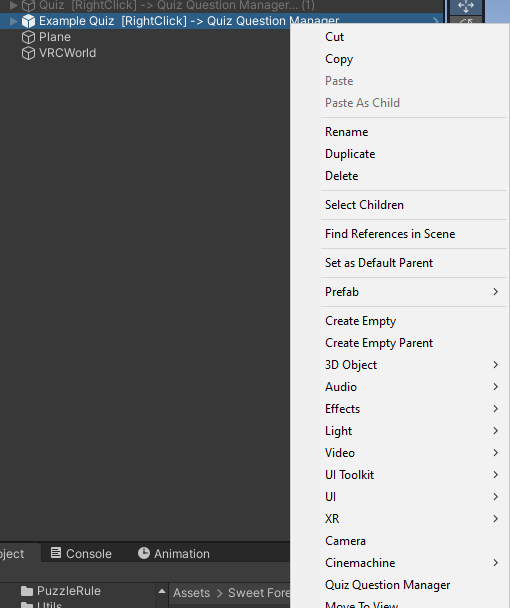
<figure><img src="https://3016712078-files.gitbook.io/~/files/v0/b/gitbook-x-prod.appspot.com/o/spaces%2FjXTOK2hodBGk44geD5s1%2Fuploads%2FMTwfj5o8Vkn5F8UgZxMl%2Fimage.png?alt=media&amp;token=53c7ef5b-4f1a-4edc-883f-848da297e544" alt=""><figcaption><p><mark style="color:purple;">Right-Click</mark> on <strong>Object</strong> <br>1. <mark style="color:blue;">Prefab</mark> -> <strong>Unpack Completely</strong> <mark style="color:red;">(Important)</mark><br>2. <mark style="color:green;">Open Quiz Question Manager</mark></p></figcaption></figure>

### 3. Quiz Question Manager️

Load Quiz Question From XMLをクリックして、.xmlファイルを選択します。良い!

<figure><img src="https://3016712078-files.gitbook.io/~/files/v0/b/gitbook-x-prod.appspot.com/o/spaces%2FjXTOK2hodBGk44geD5s1%2Fuploads%2FXDijndwuRM8QHH1QQoMK%2Fimage.png?alt=media&amp;token=4b7b37c1-ad7e-4791-80fc-a96d7d1e0f68" alt=""><figcaption></figcaption></figure>

## XMLの書き方 📝

### 例

`<quiz>`要素の**random**属性は、ランダムな質問を意味します。**limit**属性は回答する質問の数を指定します。`<choices>`内の**correct**属性は、正しい選択肢を示します。

これらの属性を追加する必要はありません。デフォルト値は次の通りです：

`random: true`\
`limit: n（質問の数）`\
`correct: false`

合計質問数と同じにしたい場合は、limitの値を0に設定します。limitを利用可能な質問数よりも大きく設定すると、質問がループします。\
リッチテキストを使用するには、次のようにフォーマットします：\[ ... ]\_\_\_\[ / ... ]。\
`[color=red]肉 (Meat)[/color]`

```xml
<quiz random="true" limit="0">
  <question>
    <text>[b][color=blue]猫は何を食べますか？[/color] (What do cats eat?)[/b]</text>
    <choices random="true">
      <choice>[color=red]肉 (Meat)[/color]</choice>
      <choice correct="true">[color=green]魚 (Fish)[/color]</choice>
      <choice>[color=blue]野菜 (Vegetables)[/color]</choice>
      <choice>[color=purple]果物 (Fruits)[/color]</choice>
    </choices>
  </question>
  <question>
    <text>[b][color=blue]猫は何色の目を持っていますか？[/color] (What color eyes do cats have?)[/b]</text>
    <choices>
      <choice>[color=blue]赤 (Red)[/color]</choice>
      <choice>[color=red]緑 (Green)[/color]</choice>
      <choice correct="true">[color=green]黄色 (Yellow)[/color]</choice>
      <choice>[color=purple]青 (Blue)[/color]</choice>
    </choices>
  </question>
  <question>
</quiz>
```

```xml
<quiz> 
 <question>
    <text>10 ÷ 2 はいくつですか？ (What is 10 ÷ 2?)</text>
    <choices>
      <choice>2</choice>
      <choice>3</choice>
      <choice correct="true">5</choice>
      <choice>6</choice>
      <choice>7</choice>
      <choice>8</choice>
      <choice>9</choice>
    </choices>
  </question>
  <question>
    <text>7 + 4 はいくつですか？ (What is 7 + 4?)</text>
    <choices>
      <choice>9</choice>
      <choice>10</choice>
      <choice>11</choice>
      <choice correct="true">11</choice>
      <choice>12</choice>
      <choice>13</choice>
      <choice>14</choice>
    </choices>
  </question>
</quiz>
```

### Rich Text

| `[br]`        | 新しい行を作成します。                                                                        |
| ------------- | ---------------------------------------------------------------------------------- |
| `[u]`         | テキストをイタリック体にします。                                                                   |
| `[i]`         | テキストに下線を引きます。                                                                      |
| `[color]`     | テキストの色を変更します（HEXまたは色名を使用）。                                                         |
| `[size]`      | テキストのサイズを変更します（数値または相対サイズを指定）。                                                     |
| `<s>`         | テキストに打ち消し線を引きます。                                                                   |
| `[b]`         | テキストを太字にします。                                                                       |
| `and more...` | <https://docs.unity3d.com/Packages/com.unity.textmeshpro@4.0/manual/RichText.html> |

## Developer 💻

### Create Custom Trigger Event️

UdonSharp (U#)スクリプトを作成するには、基底クラスを定義し、その後、メソッドをオーバーライドする派生クラスを作成することで、QuizEventという継承クラスを作成できます。

```csharp
public override void AfterUpdatedQuestionsUI(Quiz quiz){ }
public override void AfterClickAnswer(Quiz quiz,bool isCorrect){  }
public override void OnCompletedQuizQuestions(Quiz quiz,QuestionData questionData,bool hasPassed){ }
public override void OnStartQuizQuestions(Quiz quiz){  }
```

### Register To Quiz Triggers&#x20;

<figure><img src="https://3016712078-files.gitbook.io/~/files/v0/b/gitbook-x-prod.appspot.com/o/spaces%2FjXTOK2hodBGk44geD5s1%2Fuploads%2FYAyd4e8IMCuMMljUhByE%2Fimage.png?alt=media&amp;token=ed3266d9-b89a-4673-8dee-2939364e0602" alt="" width="362"><figcaption><p>Right Click on Quiz GameObject in the scene</p></figcaption></figure>

新しいトリガーイベントスクリプトを追加するには、'+'ボタンをクリックして要素を追加し、その後、スクリプトを要素に入れます。

#### Adjust Priority?

<figure><img src="https://3016712078-files.gitbook.io/~/files/v0/b/gitbook-x-prod.appspot.com/o/spaces%2FjXTOK2hodBGk44geD5s1%2Fuploads%2F8gvn1Jrl0J0eLbB08Kqn%2Fimage.png?alt=media&amp;token=8295c0f1-49fb-414f-bfc8-3d078d63a428" alt=""><figcaption><p>Move the element. First In, First Run</p></figcaption></figure>

#### Default Trigger Event Script

<table><thead><tr><th>Trigger Event</th><th>Information</th></tr></thead><tbody><tr><td><pre><code>VisibleObjectWhenResetOrStart
</code></pre></td><td>Show or hide a GameObject when the quiz starts.</td></tr><tr><td><pre><code>TeleportWhenCompleted
</code></pre></td><td>Teleport the player to a target location when they fail or pass.</td></tr><tr><td><pre><code>SensitiveAnswer
</code></pre></td><td>Automatically fail and end the quiz on an incorrect answer.</td></tr><tr><td><pre><code>PlayMeowWhenClickQuestion
</code></pre></td><td>Play a random-pitched meow sound when the answer is correct.</td></tr><tr><td><pre><code>QuizSoundEffect
</code></pre></td><td>Default sound effects for the quiz (fail, complete, next page).</td></tr><tr><td><pre class="language-csharp"><code class="lang-csharp">TimeOutQuiz
</code></pre></td><td>End the quiz and mark it as failed</td></tr></tbody></table>

### Example

```csharp
public class PlayMeowWhenClickQuestion : QuizEvent
{
    public QuizSoundFX Meow;
    public bool OnlyCorrect;
    public override void AfterClickAnswer(Quiz quiz,bool isCorrect){

        if(quiz.CurrentLimitFinishQuestion > 1) {
            
            if(OnlyCorrect) {
                if(isCorrect) {
                    Meow.playRandomPitch();
                }
            } else {
                Meow.playRandomPitch();
            }

        }

    }
    
}

```

### Utilities

#### QuizAudioFX

QuizAudioFXスクリプトを Audio Source GameObject に追加します。このスクリプトは、カスタマイズ可能なpitch、volume、またはランダムpitchで音を再生できます。

Other in `Sweet Forest/Quiz/Scripts/Events`

<table><thead><tr><th>Utilities Scripts</th><th>Information</th></tr></thead><tbody><tr><td><pre><code>InteractResetQuizObject
</code></pre></td><td>Interact to reset the quiz.</td></tr><tr><td><pre><code>ToggleObjectInteract
</code></pre></td><td>Toggle to show or hide a GameObject.</td></tr></tbody></table>

<table><thead><tr><th>Knowing Quiz Method</th><th>Information</th></tr></thead><tbody><tr><td><pre><code>GetScores()
</code></pre></td><td>Returns the number of correct answers.</td></tr><tr><td><pre><code>GetMaxScore()
</code></pre></td><td>Returns the maximum possible score.</td></tr><tr><td><pre><code>CurrentLimitFinishQuestion
</code></pre></td><td>Return the number of remaining questions to complete.</td></tr><tr><td><pre><code>ForceImmediatelyQuiz(bool makePass)
</code></pre></td><td>Forcibly ends the quiz.</td></tr><tr><td><pre><code>ForceImmediatelyPassQuizAndComplete()
</code></pre></td><td>Forces a pass for the quiz.</td></tr><tr><td><pre><code>GetCurrentQuestion()
</code></pre></td><td>Current Question Data.</td></tr><tr><td><pre><code>UpdateQuestionsUI()
</code></pre></td><td>Update UI.</td></tr><tr><td><pre><code>Reset()
</code></pre></td><td>Resets the quiz.</td></tr></tbody></table>

## Video Demo 📺

{% embed url="<https://www.youtube.com/watch?v=93M9JfQPc6c>" %}